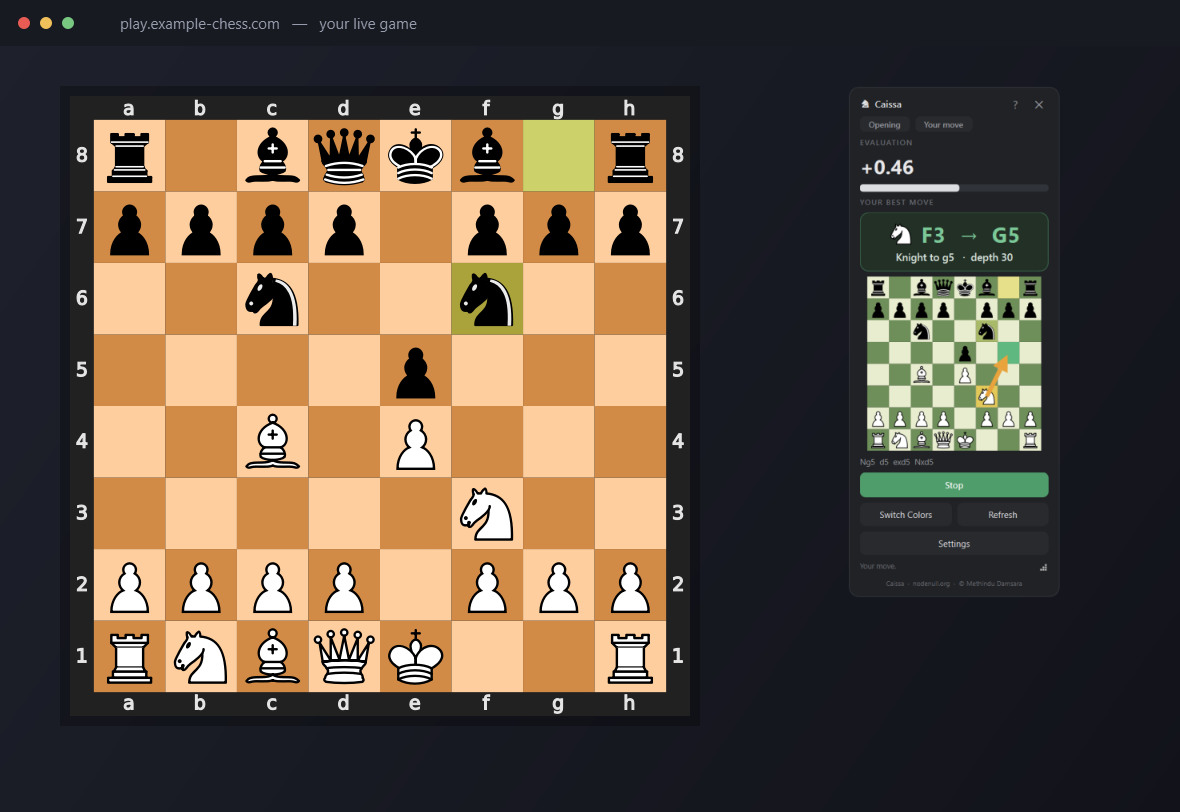
Caissa is an analysis and training project. Using engine assistance during rated or competitive play may violate platform and tournament rules. It is built for chess study, post-game analysis, analysis of saved games, demonstrations, educational computer-vision research, and streaming overlays where permitted, not for use during rated, tournament, or competitive online games.
Overview
A practical exploration of seeing, not integrating
Caissa began as a way to work through a specific set of hard problems in one project: visual scene detection on an unconstrained desktop, state reconstruction from pixels alone, validation under uncertainty when a single misread could crash the rest of the pipeline, building responsive desktop software around a slow, blocking chess engine, local engine integration over a standard protocol, and packaging a Python and Qt and OpenCV and Stockfish stack into one portable Windows executable a non-technical user can just double-click.
The chess board is not read through a website API or a browser extension. Caissa never talks to Chess.com, Lichess, or any other service, and it injects nothing into a page or process. It looks at the screen the same way a person does, finds the board by its checkerboard pattern, and reads the pieces from pixels. That single design choice is what makes it work identically on any site, any desktop chess GUI, or a streaming overlay, rather than being tied to one platform's markup or API.
System Pipeline
From screen pixels to a suggested move
Every stage the image and the position pass through, in the repository's own terminology.
Screen capture
The active screen region is grabbed with mss as a BGR image, either the full virtual desktop while searching or a locked rectangle while tracking.
Frame difference gate
A cheap 96x96 grayscale fingerprint of the locked region is compared to the previous frame. Below the "unchanged" threshold, the expensive 64-square read is skipped entirely.
Board candidate detection
On an unlocked screen, board_finder scores every region of the image for checkerboard statistics across multiple square sizes, using vectorised integral images for speed.
Grid alignment
The strongest candidates are refined by fitting a comb of nine equally-spaced grid lines to the image gradient, sub-pixel snapped, so the crop lands exactly on the 64 squares regardless of what pieces sit on them.
Square extraction
The aligned board is sliced into an 8x8 grid; each square is trimmed and resampled to a fixed size for matching.
Piece recognition
Every square is matched against per-square-colour piece templates learned earlier from a real starting position, using mean absolute pixel difference.
Legal position validation
The reconstructed 64-square placement is tested against the rules of chess. An illegal or implausible position is rejected outright rather than shown or acted on.
FEN / board reconstruction
A valid placement is turned into a full python-chess board object, including inferred castling rights and side to move.
Stockfish analysis
The position is handed to a local Stockfish process over UCI, with the search streamed live and cancellable the instant the screen changes.
Overlay rendering
The best move is drawn on the mini-board as an arrow with the origin and destination squares highlighted, alongside a plain-English description.
Steps 3-4 (candidate detection and grid alignment) run while searching for a board; step 2 (the frame-difference gate) applies once a board is locked and being tracked, to avoid re-running the expensive read on an unchanged screen.
Computer Vision
Finding and reading a board with no trained model
Capture. Frames come from mss, a fast, lightweight screen-grabber, as
raw BGR arrays; no display driver hooks or window-specific capture are used, so it works
the same way for a browser tab, a desktop chess GUI, or a streaming overlay.
Finding candidate regions. A downscaled copy of the screen is scored for checkerboard statistics at multiple square sizes using vectorised integral images: for every candidate origin and cell size, the finder compares the mean brightness of the "should be light" squares against the "should be dark" squares and rewards a strong, consistent gap. This runs across a geometric range of scales in one pass, and the strongest non-overlapping hits become candidates.
Grid-line fitting. A coarse candidate is then refined by fitting a comb of nine equally-spaced lines, the eight-by-eight grid's boundaries, to the image's Sobel gradient along each axis. Because full-span grid lines dominate the summed gradient wherever pieces sit, this refinement is piece-robust, and a final sub-pixel snap (nearest gradient peak with parabolic interpolation, least-squares fit across all nine lines) locks the crop onto the exact grid.
Square extraction and template matching. The aligned board is sliced into 64 cells, each trimmed at the edges (to avoid grid lines and rank/file labels) and resampled to a fixed size. There is no trained neural network: the app calibrates once on a known starting position, learns what each piece's sprite looks like on both light and dark squares from real pixels, and reads any later position by matching every square's cell against those templates with mean absolute difference. Templates are saved to disk, so a board theme only needs to be learned once, ever.
Orientation and piece-template learning. A fresh starting position is recognised without any template at all: the two outer rows are full and the four middle rows are empty, and whichever side is brighter is assumed to be White's army. That single frame is enough to learn every piece's appearance and which colour the user is playing.
Excluding its own overlay. Because the app is itself an always-on-top window showing a small chessboard, it would otherwise appear in every screenshot it takes. The analysis worker is given the overlay's own on-screen rectangle and explicitly rejects any candidate that overlaps it by more than a small margin, so it can never lock onto its own reflection.
Recovering from missed frames or joining mid-game. The full position is reconstructed from scratch on every scan rather than tracked incrementally move by move, so a missed frame simply gets corrected on the next one, and the app can lock onto a game that is already in progress the same way it locks onto a fresh one, provided the piece templates for that board theme are already known.
Detection is not treated as reliable on its own. The finder only ever proposes rectangles; nothing is trusted until the board reader independently validates it, either as a legible fresh starting position or as a legal position read with high confidence. A wrong candidate, an unrelated grid pattern on a webpage, a diagram, an unrelated UI element, simply fails validation and is silently skipped. That confidence gate is what makes fully automatic detection safe to run continuously; small example or diagram boards are additionally filtered out by a minimum-size threshold before validation is even attempted.
Position Reconstruction & Validation
Vision proposes, chess rules decide
Raw square classification is never trusted by itself. It is layered with domain rules before anything reaches the screen.
Classify every square
Each of the 64 cells is matched independently against the learned templates, producing a raw piece-or-empty guess per square plus a confidence margin.
Rebuild the board
The 64 guesses are assembled into a full placement and turned into a python-chess board object, with castling rights inferred from which king and rook pieces are still on their home squares.
Test plausibility and legality
The rebuilt position is checked against python-chess's own legality rules for both possible sides to move. If neither side produces a valid position, the read is discarded and the app simply waits for the next scan.
Infer orientation and side to move
When only one side yields a legal position, that resolves it outright. Otherwise the app looks at which pieces just changed to infer who moved, falls back to flipping the previous side to move, or falls back again to the last known side to move.
Reject uncertain candidates
A candidate board is only ever locked onto if it is a recognisable fresh game or reads as a legal position above a minimum confidence threshold; anything else is left unlocked.
Self-correct when the board changes
Because the position is rebuilt from pixels on every scan rather than tracked incrementally, a bad read on one frame never persists. The very next scan starts from a clean slate.
Combining computer vision with domain rules this way is more reliable than trusting raw image classification alone, because the legality check acts as a free, extremely strong error filter: the overwhelming majority of pixel-classification mistakes produce a position that no legal game could ever reach, so they are caught and discarded automatically, without needing a confidence-tuned classifier to get every square right on every frame.
State Machine & Processing Model
Two states: SEARCHING and TRACKING
The worker thread's own docstring names exactly two operating states. Locking onto a board is the transition between them, not a third persistent state.
SEARCHING
No board is locked. Every ~0.8 seconds the worker grabs the full virtual screen, asks the board finder for candidate regions, and validates each one: a recognisable fresh starting position is learned and locked immediately; with piece templates already known, a candidate that reads as a legal position with enough confidence is locked as a mid-game join. A candidate overlapping the app's own window is always skipped.
TRACKING
A board is locked. The full position is read every poll (subject to the frame-diff gate), and a changed, stable position is sent to the engine for analysis. A fresh game detected mid-tracking triggers automatic re-learning. If the locked region stops reading as a recognisable board for about six continuous seconds, the lock is dropped and the worker returns to SEARCHING.
Recovery is built into both directions: a bad or stale lock naturally times out back to SEARCHING rather than getting stuck, and a fresh game detected while already TRACKING (a rematch, or a new game started in the same window) re-triggers the learning step without needing to fully re-search the screen.
Concurrency & Responsiveness
One background thread, three signals back to the UI
The entire capture, vision, and engine loop runs inside a single QThread
subclass, the analysis worker, so screen grabbing, image processing, and Stockfish search
never touch the Qt UI thread directly. The worker reports back over exactly three signals,
analysis_ready, status, and error, which Qt safely
marshals onto the UI thread's own event loop. Every user control (Start/Stop, Switch
Colors, Refresh, Calibrate, a Debug Shot) is implemented as a small flag the UI thread sets
and the worker thread checks on its next loop iteration, so button clicks never block on
the worker and the worker never touches a Qt widget from off the UI thread.
Non-blocking, cancellable analysis. Engine search runs through
analyse_stream(), which streams a callback on every depth improvement instead
of blocking until a fixed depth or time is reached. An abort callback is checked roughly
every 200 milliseconds during the search: it re-grabs the board region and compares it
against the frame the search started from, and the moment the pixels differ by more than a
small threshold, or the user presses a button, the search is stopped immediately. A
position change on screen therefore interrupts a running search within a fraction of a
second rather than waiting for it to finish.
Streamed output, refined progressively. On the user's own turn, every depth improvement is pushed to the UI as it arrives, so a first move typically appears in around 100 milliseconds and keeps refining live up to the configured thinking-time cap. Once past a shallow depth, updates are throttled to at most one every 150 milliseconds so the UI thread is never flooded. On the opponent's turn the same search still runs, as a ponder that warms the engine's hash table so the eventual reply comes back deeper and faster, but only the final evaluation is surfaced.
Skipping unnecessary work. A cheap 96x96 grayscale fingerprint of the tracked region is compared against the previous frame on every poll. When it is effectively unchanged, the expensive 64-square template-match read is skipped outright and the loop simply sleeps until the next poll, a full re-read is still forced at least once a second so a covered or closed board is still caught. Once a change is detected, the app re-confirms it at a much faster interval so a settled move is committed, and the engine started, as quickly as possible rather than waiting for the normal, more conservative poll interval.
Local Stockfish Integration
A local process, spoken to over UCI
Validated position
Only a position that has already passed legality validation is ever handed to the engine.
python-chess / UCI
python-chess wraps the engine as a subprocess and speaks the standard UCI protocol to it, so the app never parses raw engine text itself.
Local Stockfish process
Stockfish 17.1 runs as a separate operating-system process on the same machine, launched hidden (no console window) on Windows.
Streamed principal variation
Each depth improvement is streamed back as it completes rather than waiting for one final answer.
Overlay update
The current best line updates the mini-board's arrow and highlighted squares live as the search deepens.
Local by design. Because the engine is a local subprocess spoken to over UCI, a position never needs to be sent to a cloud API to get an evaluation, the search happens entirely on the user's own machine.
Controlled lookup. The engine binary is located through a fixed search order: a
PyInstaller onefile build's unpacked temp directory, next to the running executable, the
project's own engine/ folder when running from source, and finally the system
PATH. A user-supplied custom engine path from Settings always takes precedence
over the bundled one when it points at a real file.
Time-capped, not depth-capped. The configured search depth is effectively unbounded on purpose; it is the thinking-time cap that actually bounds how long a search can run, so the engine keeps improving an easy or won position all the way to the time budget instead of stopping early and leaving depth on the table.
CPU usage and searches are cancelled on change. The number of engine threads is configurable in Settings (default: half the machine's CPU cores, to stay polite to whatever the user is running), and, as described above, a running search is aborted the instant the on-screen position changes.
Compatibility checking and a non-AVX2 fallback. The bundled Stockfish build requires
AVX2 instructions. A dedicated health check launches the engine binary directly with a raw
uci handshake (bypassing python-chess) so the app can read the process's actual
exit code and tell an illegal-instruction crash apart from a missing or broken binary. This
check runs automatically shortly after the window first appears; on a CPU that cannot run
the bundled build, the app shows a clear message rather than silently producing no moves,
and points the user at Settings → Custom engine to supply a non-AVX2 Stockfish build
instead.
On Windows, the engine's operating-system process is additionally tied to the app's own
lifetime through a Job Object with KILL_ON_JOB_CLOSE, so even a crash or a
forced termination of the app cannot leave an orphaned Stockfish process running in the
background.
Desktop UI & Interaction
A small, always-on-top control surface
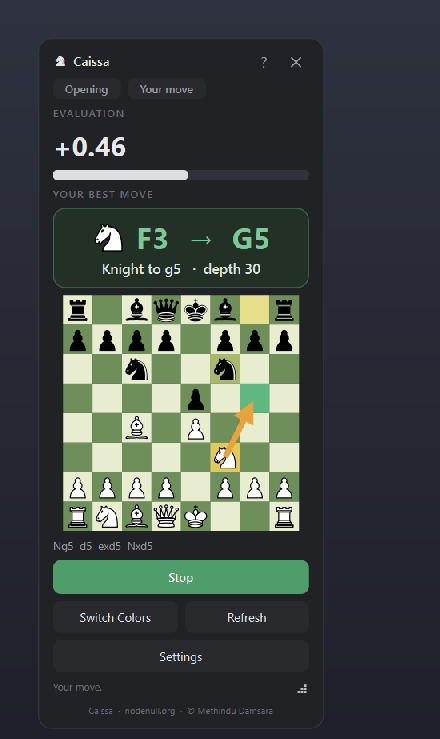
The main window is a small, frameless, always-on-top widget so it stays visible over
whatever chess game it is watching. Its mini-board is rendered as vector SVG through
chess.svg, deliberately not drawn with Unicode chess glyphs, since font
fallback on Windows can silently substitute or drop specific chess glyphs, which showed up
as pieces simply missing from the board. SVG rendering is deterministic on every machine.
The suggested move is shown three ways at once so it is impossible to miss: an amber arrow drawn from the origin to the destination square, the origin square filled a soft yellow (the piece to pick up), and the destination square filled green (where it goes). The window is freely resizable via a grip in its bottom-right corner, and the chosen size is remembered between launches.
Four buttons cover normal use: Start / Stop toggles the assistant, Switch Colors flips which side is treated as the user's when the auto-detected orientation is wrong, Refresh drops the current lock and re-finds and re-reads the board from scratch (the recovery path if a move is ever missed), and Settings opens the configuration dialog. A small help button and close button sit in the window's own custom title area.
Settings and fallbacks. The Settings dialog exposes a thinking-time slider and a CPU-cores slider (labelled with the machine's actual core count), a Browse control for a custom engine path, and three manual troubleshooting tools: Set board box opens a full-screen, semi-transparent region selector spanning every monitor so the user can rubber-band the board area by hand (the selector converts Qt's logical pixel coordinates to the physical pixels the capture layer needs, accounting for display scaling); Calibrate re-learns the piece templates on demand from whatever is currently on screen, after first validating that it really is a fresh, correctly aligned starting position; and Debug shot saves the current capture, plus a copy with the 8x8 grid drawn over it, for troubleshooting an unusual board theme.
Packaging & Portability
One file, nothing to install
The build script drives PyInstaller in --onefile --windowed mode, bundling the
Python runtime, every dependency (PyQt6, OpenCV, NumPy, mss, python-chess), the app icon,
and the Stockfish binary itself into a single Caissa.exe at the project root.
A Windows version-info resource is embedded too, so Explorer's Properties → Details
panel shows a proper product name, version, and copyright line instead of a bare filename.
Build scratch is written to a temporary folder and cleaned up automatically once the build
succeeds.
Source vs. release. Running from source needs Python 3.10+, the pip requirements, and a Stockfish binary the developer supplies themselves (it is not committed to the repository, since it is both large and separately GPL-licensed). Downloading the release instead gets one self-contained executable, currently v1.1.0 at roughly 152 MB, with the Python runtime, every library, and the engine already inside it; nothing else to install.
Startup and extraction. A PyInstaller onefile build unpacks itself to a temporary directory the first time it runs, which takes a few seconds; because the executable is not code-signed, Windows SmartScreen may show a one-time warning on first launch. About 400 milliseconds after the window first paints, the app runs its own engine compatibility check and shows a clear dialog if the bundled Stockfish cannot run on that CPU.
Portable vs. normal mode. By default settings and the learned board templates live in
the normal per-user Windows location, %LOCALAPPDATA%\Caissa, keeping the
install folder itself untouched. Placing a portable.txt marker file next to the
executable switches to portable mode instead: everything is then kept in a
Caissa-data folder right beside the app, so the whole thing travels on a USB
stick, with an automatic fallback back to the normal location if that folder cannot be
written to. Nothing in the codebase requests administrator rights or writes outside those
two locations.
Distribution. Builds are published through GitHub Releases. The current release,
v1.1.0, ships as a plain Caissa.exe; a companion
v1.1.0 (Portable) release ships the same build pre-configured for the portable-mode
workflow above as a zip.
Data Handling & Privacy
What actually touches the disk
All capture and processing happens locally, in memory, on the same machine the app runs on.
Screenshots grabbed by mss exist as in-memory NumPy arrays for the length of one
pipeline pass and are never written to disk as part of normal operation. The source contains
no networking code of any kind, no socket, HTTP, or telemetry calls anywhere in the
application; the only external process it ever talks to is the local Stockfish binary, over
UCI on its own stdin and stdout.
Two kinds of data are written to disk, both to the app's own user-data directory: the app's
settings as a small config.json, and the learned piece templates as a
compressed board_templates.npz, produced once per board theme by calibration or
automatic learning and reused across restarts so the same theme never needs relearning.
Debug images, a raw capture plus a grid-overlaid copy, are the only screen-derived files ever
written, and only when the user explicitly presses the Debug Shot button in Settings.
The default storage location is %LOCALAPPDATA%\Caissa, matching normal Windows
per-user application conventions. In portable mode (see Packaging above), all of the same
files are written to a Caissa-data folder beside the executable instead, so
nothing persists on the host machine once that folder is removed.
Testing & Continuous Integration
A test suite that needs no engine, no display, and no GUI toolkit
The vision pipeline and the core logic each have their own self-contained pytest suite.
test_vision.py covers the hardest part of the app: it renders synthetic
"desktop plus chessboard" images entirely with NumPy, OpenCV, and python-chess (a small
helper module, deliberately engine-free and GUI-free), then asserts the board finder locates
a known board rectangle with better than 90% IoU accuracy, correctly reports no confident
candidate on a busy board-free desktop, and that the reader learns a starting position
exactly and can correctly read a synthetic mid-game position, including with the board
rotated to Black's orientation. test_logic.py covers plain-English move
descriptions (simple moves, captures, checkmate, castling), the game-phase heuristic, and the
configuration schema's migration behaviour across several past config versions, including
that unknown keys in an old config file are safely ignored. Neither suite imports PyQt6 or
needs a display, so the whole thing runs anywhere, including a headless CI runner. No test
coverage percentage is measured or reported by the project.
Push
To main/master, on every pull request, or manually via workflow_dispatch.
GitHub Actions
Runs on ubuntu-latest.
Python environment
A matrix of Python 3.10 and 3.12, with numpy, opencv-python-headless, and chess installed (the headless OpenCV build avoids pulling in GUI/GL libraries the runner does not need).
Static / compile checks
python -m compileall -q src run.py build.py byte-compiles the entire source tree, catching syntax errors even in code the test suite does not directly exercise.
pytest
python -m pytest tests/ -q runs both suites above.
Pass or fail
The workflow's status gates the push or pull request.
Challenges & Solutions
Engineering problems worth naming
Challenge
Finding a chessboard across different websites, colour themes, and screen sizes.
Solution
Multi-scale checkerboard scoring across a range of cell sizes, followed by piece-robust grid-line fitting and legality validation before anything is trusted.
Challenge
Avoiding false detections of unrelated grids on a page, or of the app's own on-screen board.
Solution
Candidate rejection via legal-position validation, plus explicit exclusion of the overlay's own window rectangle from every scan.
Challenge
Keeping the interface responsive during continuous image processing and engine analysis.
Solution
A dedicated worker thread, streamed engine output, immediate search cancellation on a position change, and a frame-difference gate that skips reads on an unchanged screen.
Challenge
Reconstructing a full game state with no access to a website's own API.
Solution
Read the entire board from pixels on every scan rather than tracking moves incrementally, and combine that visual evidence with the actual rules of chess.
Challenge
Distributing a Python, Qt, OpenCV, and Stockfish application to non-technical users.
Solution
A self-contained PyInstaller Windows build with every runtime component bundled inside, published through GitHub Releases.
Challenge
Supporting machines with different CPU instruction sets.
Solution
A startup compatibility check that distinguishes an AVX2 instruction crash from other failures, with a documented custom-engine fallback for older CPUs.
Limitations
What this is not built to do
Flat, 2-D boards only. Three-dimensional or perspective-rendered board views are not supported.
Unusual themes may need calibration. Auto-detection is tuned for common board styles; a very unusual theme may need the manual Calibrate or Set board box fallback.
Orientation can be ambiguous on a cold mid-game join. Whose move it is can be guessed wrong when locking onto a game already in progress; Switch Colors corrects it, and the app self-corrects once a move is played.
Screen scaling and visual effects can reduce confidence. The region selector accounts for Windows display scaling when capturing, but move-highlight animations or unusual rendering effects can still lower read confidence on some sites.
Not built for competitive engine-assisted play. See the fair-play notice above; this is an analysis and training tool by design.
SmartScreen on first launch. Because the release executable is not code-signed, Windows SmartScreen may show a one-time warning the first time it runs.
Cybersecurity & Safety Perspective
Not a security project, but built with care
Caissa is a computer-vision and desktop-systems project first. These are the grounded, verifiable safety properties of how it is built, not a claim of formal security review.
Local processing
All capture and vision processing runs in-memory, on the local machine; there is no networking code anywhere in the application source.
Dependency attribution
Every third-party component, exact version, and licence is listed and traceable in THIRD_PARTY.txt, kept in step with the actual bundled versions.
Executable trust
The release .exe is not code-signed, so Windows SmartScreen can warn on first launch; this is disclosed rather than hidden.
Safe process invocation
The engine subprocess is launched with an explicit, resolved absolute path rather than an ambient or user-controllable string, and hidden without a console window on Windows.
Controlled engine path resolution
The engine location follows a fixed, ordered lookup (bundled locations, then PATH) rather than trusting an arbitrary environment value; a custom path is only used if the user explicitly sets one and it points at a real file.
Process lifetime control
On Windows, a Job Object with KILL_ON_JOB_CLOSE ties the engine subprocess's lifetime to the app's own, preventing orphaned processes even after a crash.
No automatic remote execution
The app never fetches or runs remote code, and has no update mechanism that executes downloaded content automatically.
No credential collection, injection, or interception
Caissa never asks for or stores chess-site credentials, injects scripts or content into a browser or page, and does not intercept network traffic; it only reads pixels already on screen.
On misuse. The core capability, real-time engine assistance, carries an obvious potential for misuse in competitive online play. The fair-play notice is placed at the top of this page and in the project's own README rather than buried, and the project positions itself explicitly as an analysis and training tool, not a tool for undetected use during rated games.
Software Architecture
One responsibility per module
The repository's actual src/caissa/ layout, one concern per file.
app.py
Application entry point: builds the Qt app, shows the window, and runs the startup engine health check.
config.py
The settings dataclass, its JSON persistence, versioned migration, and the portable-vs-normal user-data directory logic.
capture.py
Screen capture via mss, wrapped for a fixed region or the full virtual desktop.
board_finder.py
Locates candidate board regions on screen: checkerboard scoring plus grid-line comb fitting.
board_reader.py
Reads the full position from pixels via template matching, and resolves it to a valid, oriented board.
board_state.py
Game-phase classification and plain-English move descriptions.
engine.py
The Stockfish wrapper: blocking and streamed analysis, engine-health checks, and Windows process-lifetime management.
engine_locator.py
Resolves an absolute path to the bundled or a custom engine binary.
analysis_worker.py
The QThread that runs the SEARCHING / TRACKING loop end to end and emits results back to the UI.
ui/overlay.py
The main always-on-top window, its buttons, and the Settings dialog.
ui/mini_board.py
The compact SVG chessboard widget with the move arrow and square highlights.
ui/region_selector.py
The full-screen manual board-region picker, with logical-to-physical pixel conversion for scaled displays.
tests/
The engine-free, display-free pytest suite covering vision and core logic.
resources/
The app icon and its procedural generator, plus the Windows version resource.
build.py
Drives PyInstaller to produce the single self-contained Caissa.exe.
The separation is deliberate: capture only ever produces raw pixels, vision
(board_finder / board_reader) only ever proposes and reads
candidates, domain validation lives in python-chess's own legality
rules rather than in the vision code, engine analysis is fully isolated behind a UCI
wrapper, application state lives in the worker thread and the config object, and
presentation is confined to the ui/ package. None of the vision or
engine modules import PyQt6 at all, which is exactly what keeps the test suite GUI-free.
Skills Demonstrated
By category
Computer vision
Desktop engineering
Software engineering
Applied algorithms
Systems integration
Future Improvements
What would come next
Digitally signed Windows releases, to remove the first-launch SmartScreen prompt.
Broader generalisation across unusual board themes, reducing how often manual calibration is needed.
A stronger piece-recognition approach for low-contrast or highly stylised sets.
Support for additional board layouts beyond the current flat 2-D assumption.
Improved DPI and multi-monitor handling for less common display configurations.
Optional move-history export for reviewing a session afterward.
Post-game report generation summarising a reviewed game.
Benchmark tooling to track detection accuracy and latency over time.
A visible confidence indicator in the UI, surfacing how sure the current read is.
Improved accessibility of the overlay itself.
Linux or macOS builds, if the packaging and screen-capture path prove technically feasible there.
Caissa Chess Overlay
Read the code, try the release, or review the fair-play notice
Built solo end to end: computer vision, desktop UI, local engine integration, and Windows packaging.